Introduction
MCP (Model Context Protocol) is a protocol that standardizes a way for LLMs to provide themselves with external context in order to answer a prompt. Plainly put, you don't have to copy and paste stuff anymore into the LLM, the LLM knows how to get the information itself and can act on it. MCP solves the so called Many-to-Many-Problem in LLM API calling, which means that many different LLMs need to call many different external APIs to get the necessary context. Each API is different to one another as well as the LLMs that are finetuned to generate different API request formats. Anthropic created MCP to enable LLMs to interact with APIs via a Unified Interface.
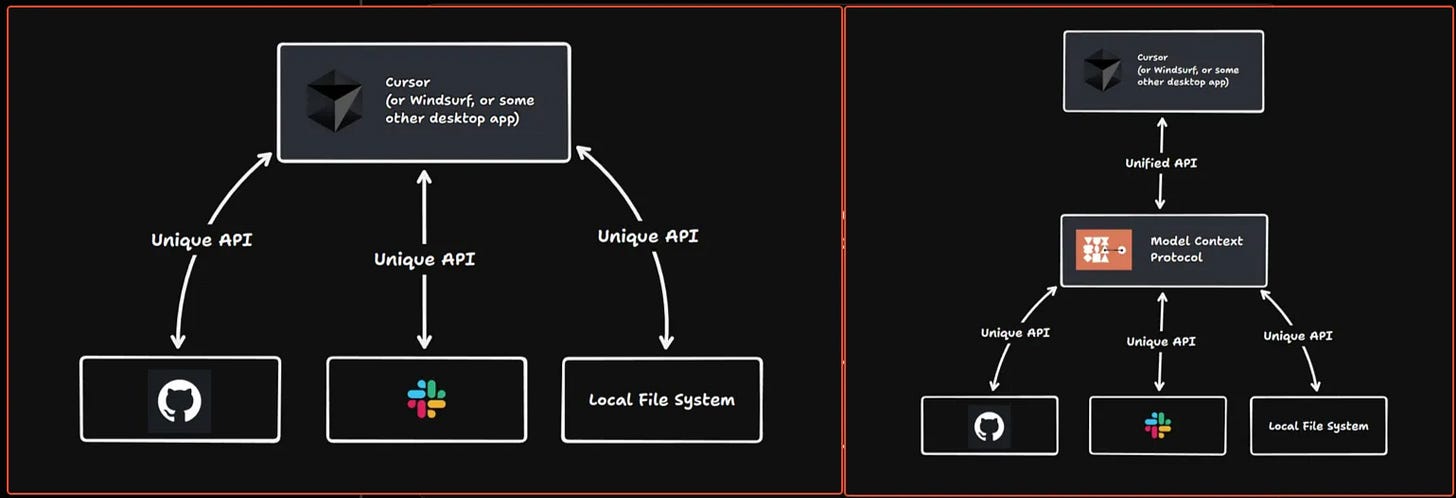
How does MCP work?
The protocol defines two entities, a client and a server, that communicate with each other over a certain JSON schema called JSONRPC 2.0 (RPC stands for Remote Procedure Call).
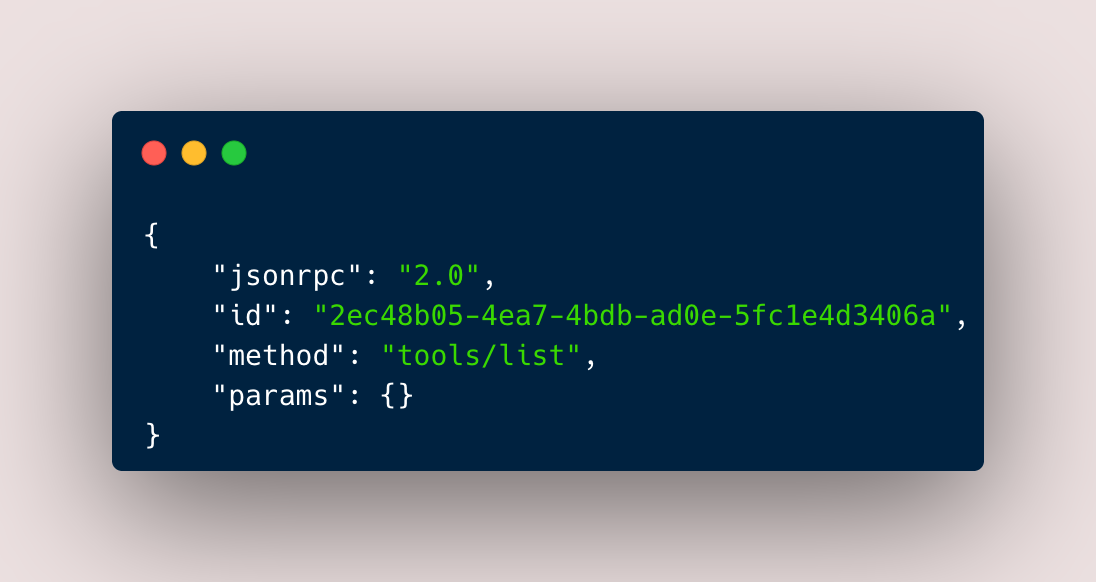
An example MCP request (see below) in JSONRPC 2.0 format consists of four keys
jsonrpc with the version identifier (2.0)
id usually with an unique hexadecimal string
method with the name of the endpoint/procedure to call
params with all required parameters to call the method
MCP is very similar to LSP (Language Server Protocol), which is used i.e in Code Editors to make it easier for features like Auto-Completion to work for all the different programming languages by also providing a unified interface for the editor [2].
The client (the LLM) initiates the conversation with a request to an “endpoint” called “tools/list”.
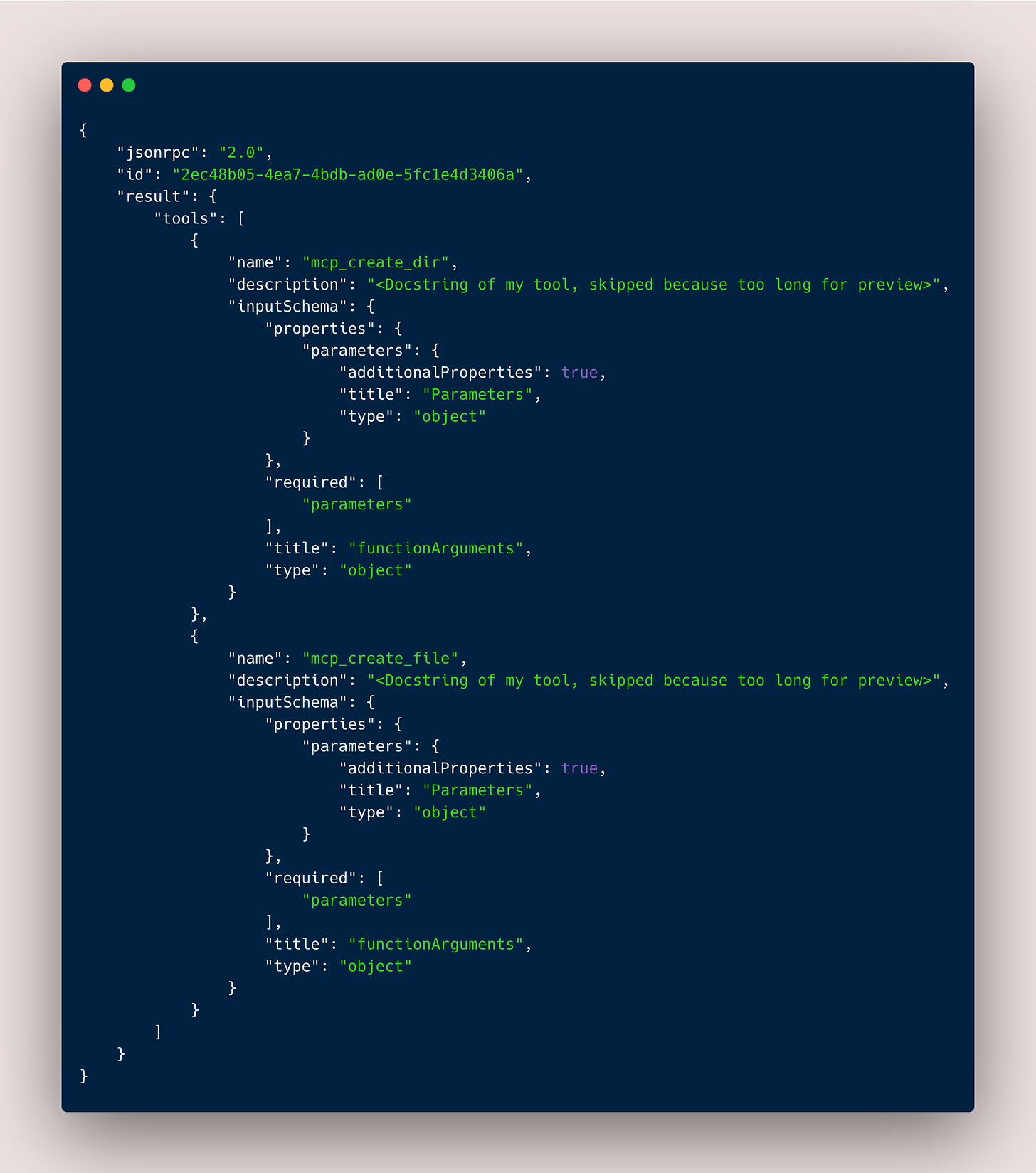
The server answers with all available tools in a MCP result object which consists of
jsonrpc with the version identifier (2.0)
id with the same as in the input request
result with a list of all available tools (with their a or error if there was an error invoking the method
Each tool is represent in a JSON schema that is very similar to the exported schema of Pydantic Models.
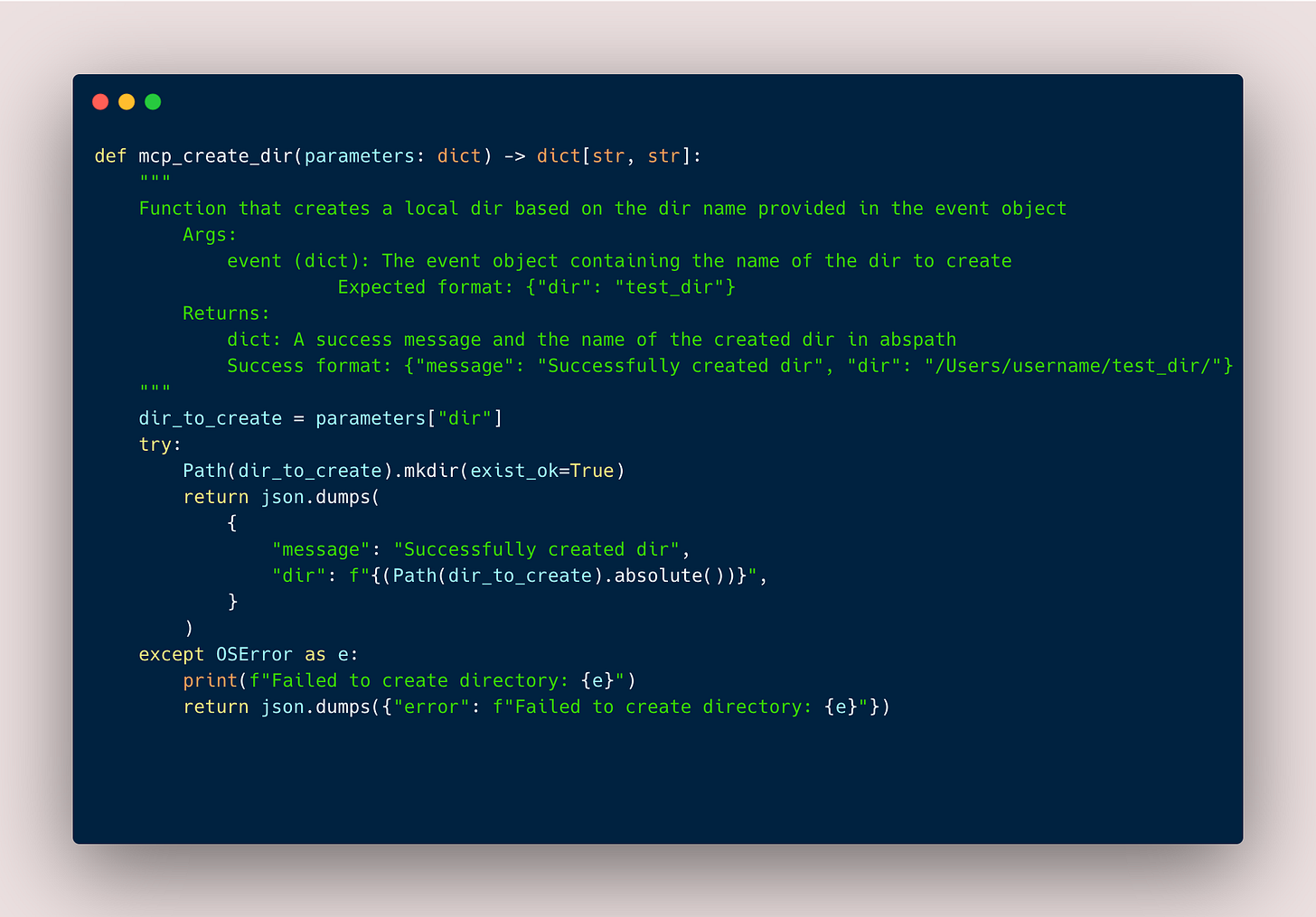
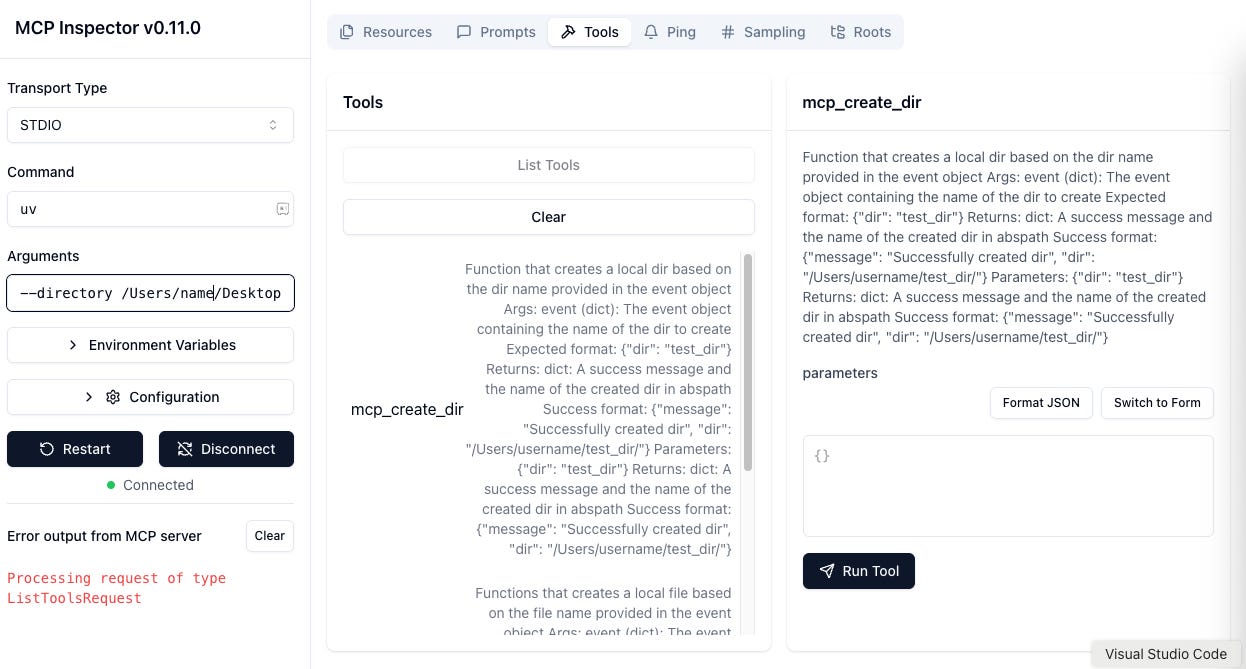
The function definition of the tool mcp_create_dir() in the result list of the server is shown below.
Depending on your prompt, the client creates a request to call one of the tools and sends a following request to the method tools/call
jsonrpc with the version identifier (2.0)
id with usually an unique hexadecimal string
method with the name of the endpoint/procedure/tool
params with the name of the tool to call and the required parameters
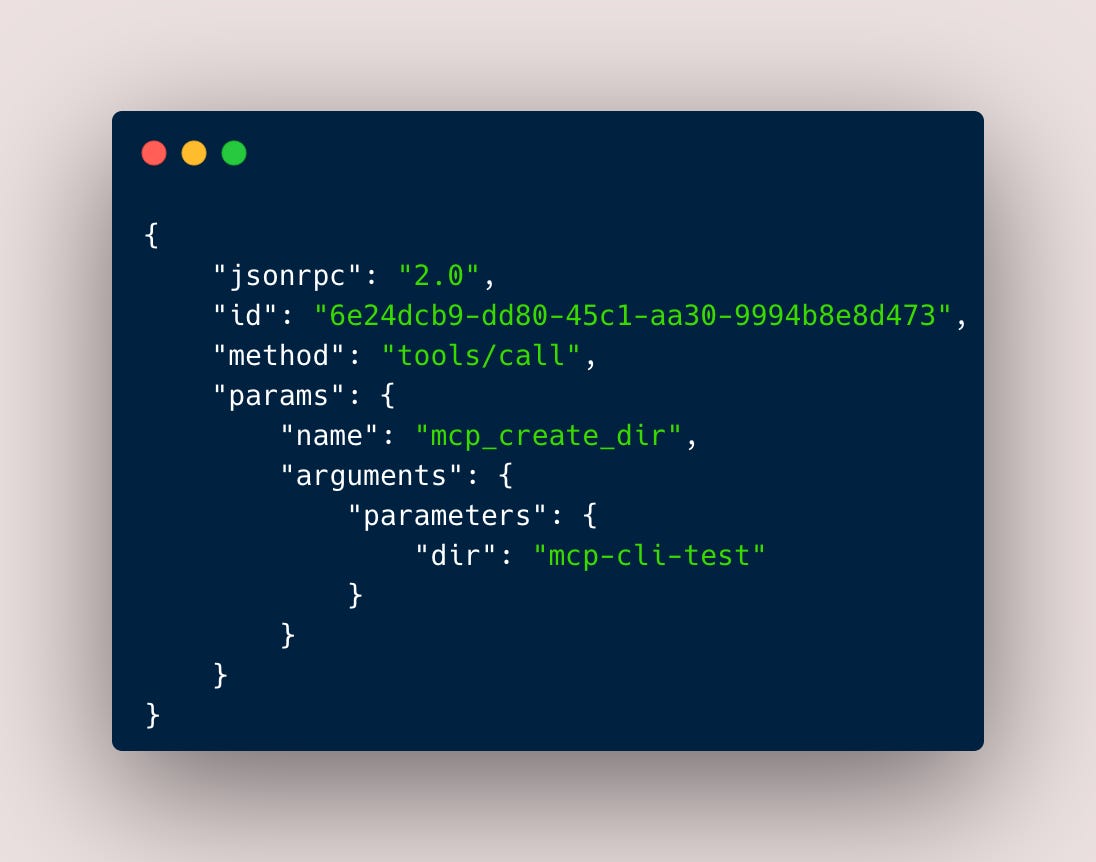
The server then answers with
jsonrpc with the version identifier (2.0)
id with usually an unique hexadecimal string
result with a list of objects that should match your response format specified in the documentation of the tool
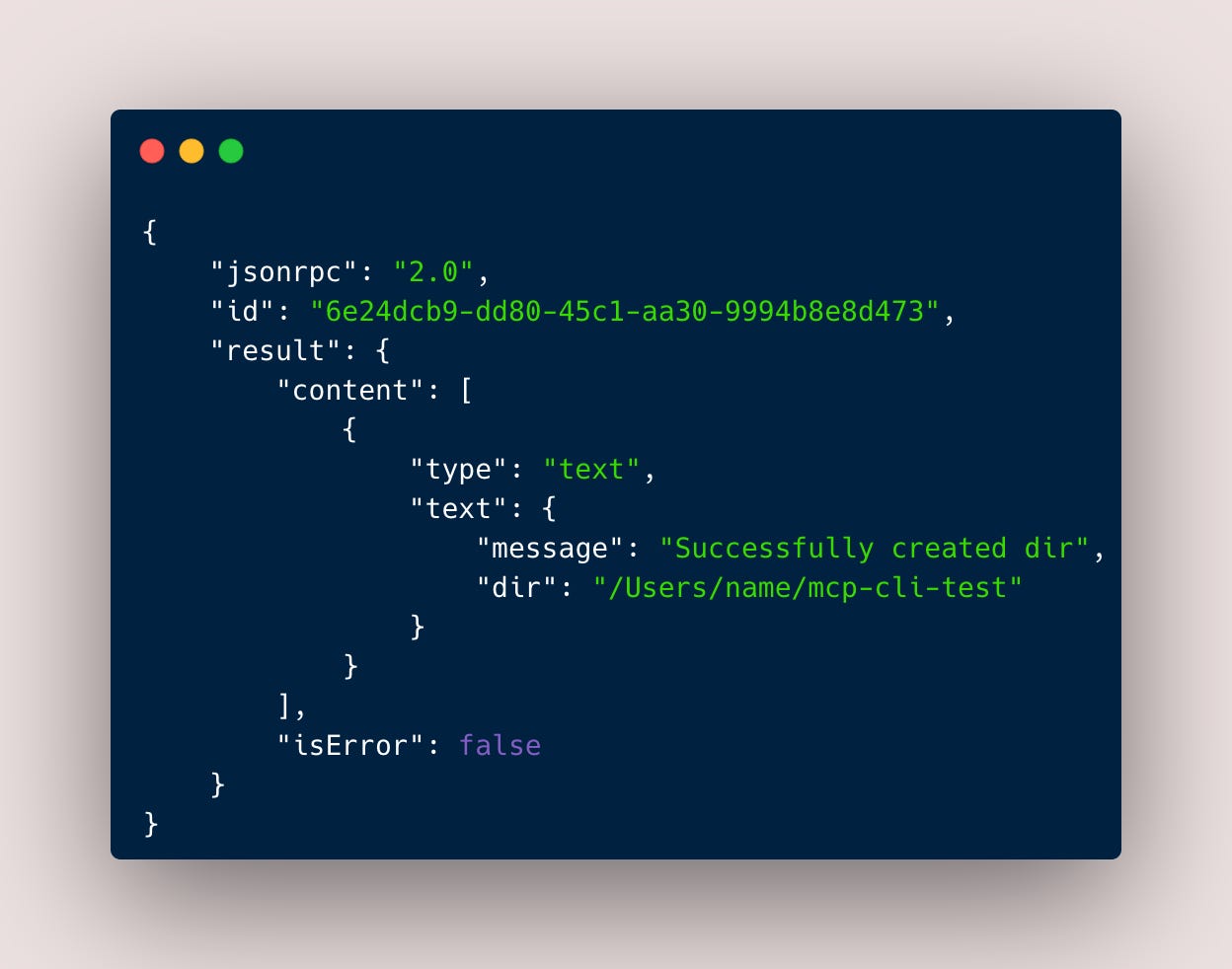
And thats basically it.
A client initializes the session with a tools/list request, the server responds with all registered tools in a JSON schema which are now in the context window of the LLM. The LLM generates a JSON request based on the input prompt, which is send to the tools/call method. The tool is called and the action performed and then the server responds in the specified return schema.
You can also expose resources and prompts on a MCP server. A resource could be a txt file (like prompts) but also database objects or pdf files. Resources and prompts are accessed the same as tools (first call resources/list, get all resources, call a specific resource with resources/call, get the requested resource (txt, binary, …) returned. I haven’t yet found them especially useful, I am always sticking with tools because, at least in Claude Desktop you have to manually select them to be in the session. You could also access them at inference time with other clients but I haven’t had the need to do that yet. I found this blog helpful to get resources and prompts running quickly in a local server if you want to try it. [4]
MCP Inspector
A great tool that Anthropic released to work on and debug MCP servers is MCP Inspector. You can run the tool like this
npx @modelcontextprotocol/inspector uv --directory /Users/name/Desktop/research/mcp-basics/ run server.py
This will start a server default on http://127.0.0.1:6274/ where you have a visual interface to call the tools|resources|prompts/lists “endpoints”, see what the MCP server mcp-basics returns and then run each tool by providing and input on the bottom right. By enabling logging you can also see each JSONRPC request in the logs of the server.
What’s the best way to use MCP?
As always, it depends.
The main variables in setting up MCP are:
Which LLM are you using and where should it be hosted?
LLMs
Proprietary (Claude-3.5/3.7-Sonnet, AWS Nova Pro, …)
Open-Source (Qwen2.5, LLama4, ..)
Hosting
Remote (Claude Desktop, …)
Local (Ollama, …)
Which server setup do you want to use?
Local (Local repo)
Remote (EC2, …)
Where should your tools be defined?
Local (Local repo)
Remote (EC2, Lambda, …)
Below I tested 4 different combinations of these variables.
Remote Client (Claude Desktop) - Local Tools - Local Server
https://modelcontextprotocol.io/quickstart/user
https://github.com/punkpeye/awesome-mcp-servers
You are using Claude Desktop, to interact with a local server that you can simply install temporarily via pipx or npx or clone the repo and then run the server in a specific directory. There are thousands of MCP servers available. Claude Desktop knows how to run the specific server via a config.json called claude_desktop_config.json.
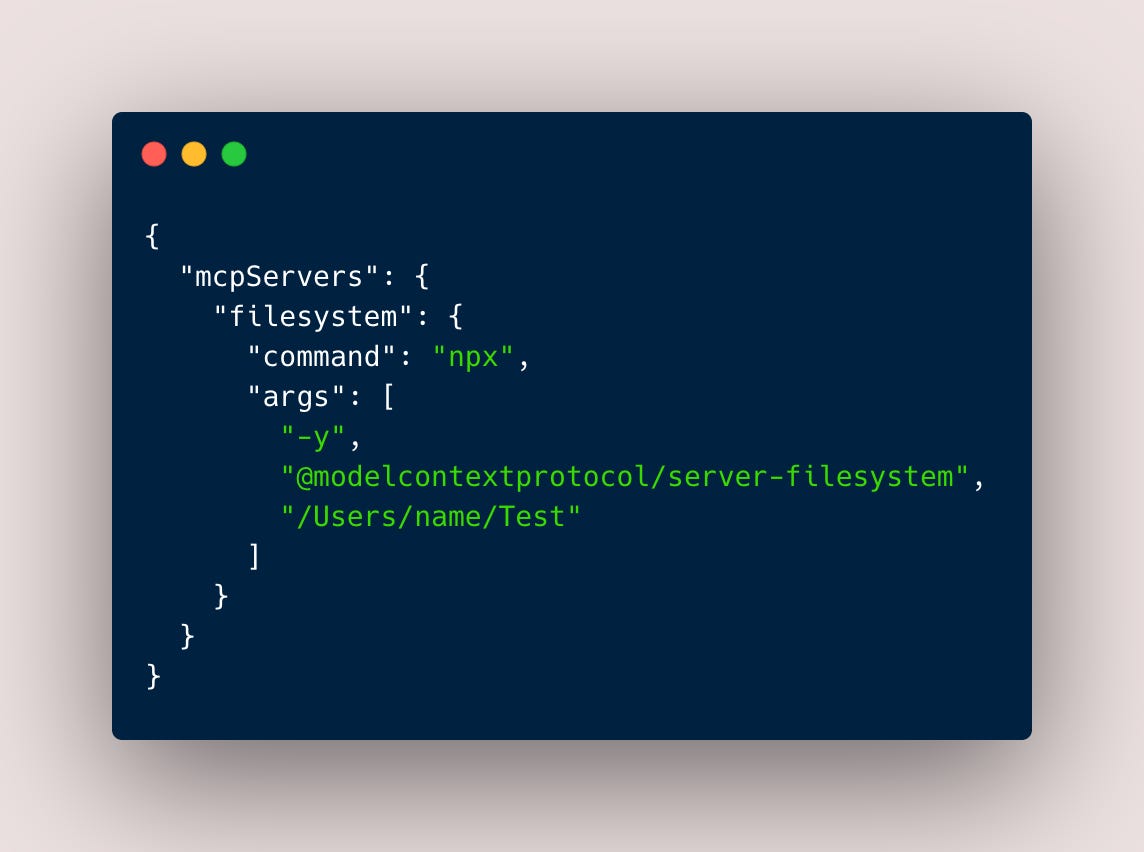
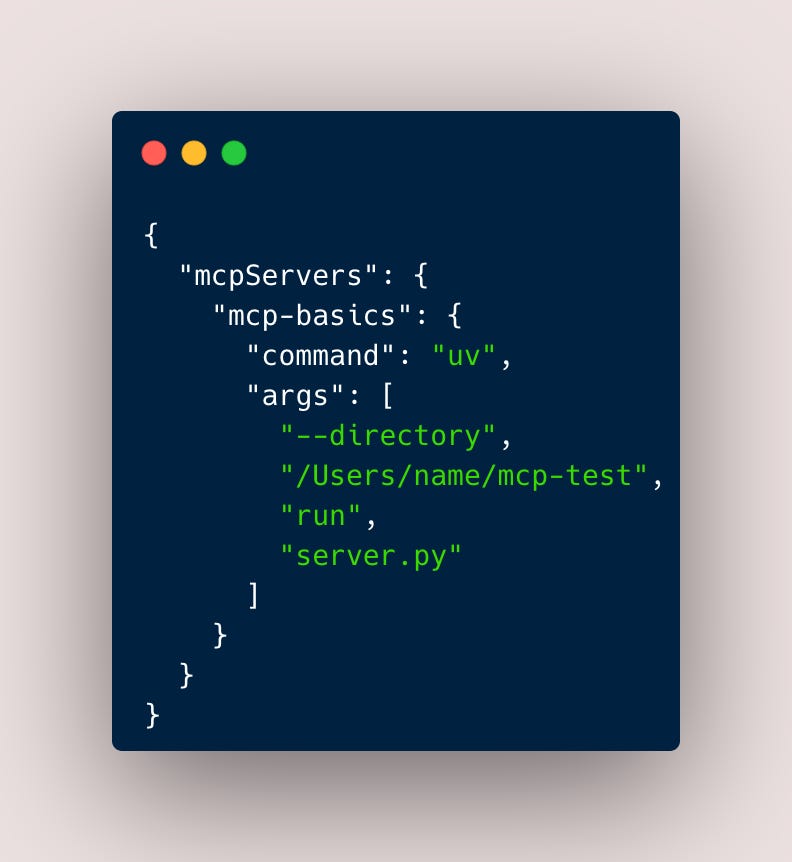
By installing Claude Desktop and going through this tutorial, you will be able to get a local server running with tools that allow the client to make changes in your local filesystem.
Setup
Install Claude Desktop
Install node (npx), python (pipx) or uv
Download or install mcp servers
Edit the config.json
Advantages
Newest server versions when accessing the servers via npx or pipx, you get all the updates of the package
SOTA model with integrated web search, file integrations etc.
Provides intuitive UI
Disadvantages
Need to clone new releases of MCP servers when not distributed as packages
Need to verify the reliability of each MCP server
Can’t use confidential data
Setup required for each person
Everybody needs to set this up themselves on their machines. If you have confidential information that you do not want to send to Claude, then this setup is not for you. You could avoid the usage of malicious MCP servers by creating a centralized server registry in the company that validates each MCP server.
Remote Client (Bedrock) - Remote Tools (Lambda) - Local Server
https://modelcontextprotocol.io/quickstart/client
https://github.com/danilop/MCP2Lambda
Another setup would be to define tools remotely, so that you can define them once and then access them from any server. The client in this repo allows you to call AWS Bedrock models. If you want to create your own there is a guide for client developers on Anthropic. Each Lambda Function stands for one tool.
Setup
Install python or node
Setup AWS credentials
Download the client and server code
Install python to run the client code and server code
Setup the Lambda Functions
Advantages
Safer to use confidential data due to AWS Bedrocks No Retention Policy
Interact with custom AWS infrastructure e.g internal company infrastructure
Doesn’t need any meaningful hardware requirements
Disadvantages
No GUI
Client and server setup required for each person
Needs to periodically refresh AWS credentials
This requires to setup your AWS credentials. Then you can list and then call Lambda Functions securely without exposing them to the public internet. However, everyone needs to have the aws-cli installed and needs to refresh the access tokens periodically which would make it harder for non-technical people to use this kind of setup. However, the technical team could maintain the lambda functions and push updates, that can be directly used by the non-technical people.
The remote client could be Claude Desktop again or you could access models via AWS Bedrock like Nova. Since Bedrock Models have a clear non-retention policy, you could also send confidential data this way. By using these models via the Inference Profile you could also be certain that your data do not leave the European Union.
Local Client (mcp-cli/ollama) - Local Tools - Local Server
https://github.com/chrishayuk/mcp-cli
This setup is completely local and uses ollama for running a local LLM (i recommend QWen2.5-7B 4Q), mcp-cli to connect the local LLM with your local server, configured over a server_config.json, just like with Claude Desktop but everything is running locally.
Setup
Install ollama
Install mcp-cli
Download or install mcp servers
Install python or node
Edit the config.json
Advantages
You can use confidential data
You can switch local models
Disadvantages
No GUI
Needs client and server setup for each person
Need to clone new releases of MCP servers when not distributed as packages
Need to verify the reliability of each MCP server
Needs at least a few GB (~3-4GB) VRAM for running locally
Context Window for local models much smaller (~32 K)
Can’t use resources and prompts
You could avoid the usage of malicious MCP servers by creating a centralized server registry in the company that validates each MCP server.
Local Client (m2m-client) - Remote Tools (EC2) - Remote Server (m2m-server/EC2)
https://github.com/Machine-To-Machine/m2m-mcp-server-ssh-server/tree/main
https://github.com/Machine-To-Machine/m2m-mcp-server-ssh-client
This setup uses two repos from machine-to-machine, a client and a server repo. The server runs on e.g an EC2 instance and registers allowed SSH keys of clients. The then authenticated clients interact with the MCP servers via a SSH tunnel.
Setup
Install python or node
Clone m2m-client
Setup EC2 instance
Clone m2m-server on EC2 instance
Start m2m-server on EC2 with all needed mcp servers
Connect client to EC2 instance via SSH
Advantages
You can use confidential data
You only need to setup the server once
You can switch local models
You can expose internal APIs
Disadvantages
No GUI
Needs only client setup for each person
The servers needs to run all the time
Needs at least a few GB (~3-4GB) VRAM for running locally
Context Window for local models smaller (~32 - 128K)
This setup creates a centralized server, that can be accessed by multiple clients. The server can also host MCP servers that expose internal company APIs, making it a great blueprint for non-technical people in the company to interact with these APIs in natural language. However, you need to setup the m2m-client and e.g ollama locally for each person as well as a GUI interface.
Issues
MCP is a great new tool, that will help a lot to make certain tasks easier or more LLM friendly. Things to keep in mind:
LLMs need to be specifically finetuned to perform API calling (i.e return valid JSON in a specific schema). The Berkeley Function Calling Leaderboard [ref] can give you an insight into which LLM performs the best in that regard.
The more tools/resources/prompts the server exposes, the more the context window gets stuffed with tokens and the answers tend to get worse. For example the simple mcp_create_dir and mcp_create_file tools of the my mcp-basics were taking up more than 1000 tokens when using AWS Nova Pro.
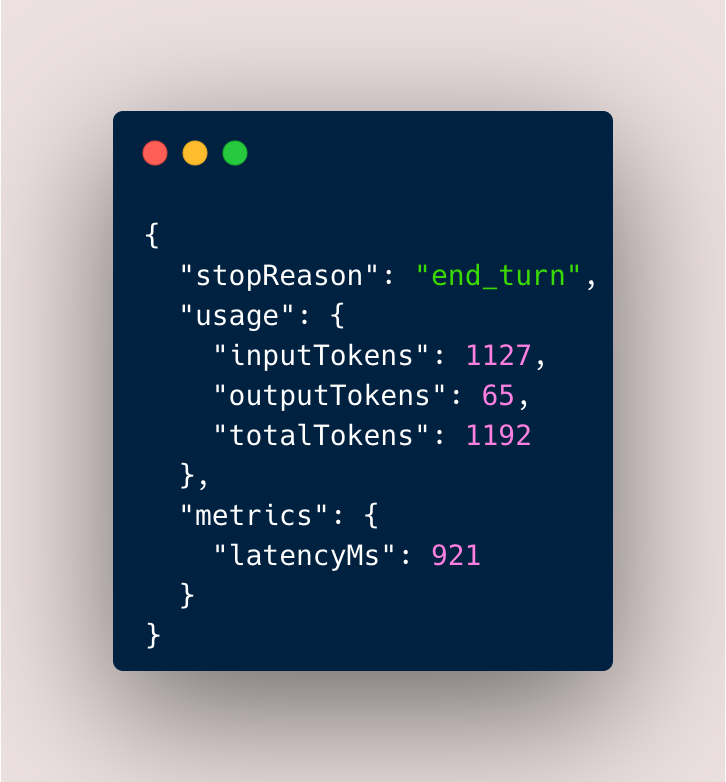
Token count when using the mcp-basics server with AWS Nova Pro.
The more tools/resources/prompts the server exposes, the more similar they will be between each other and the LLM will have a harder time to select the right one (representational collapse). To use any high production grade API properly, the server has to expose a lot of tools, making using a MCP server in the current setup less likely in scenarios where scale is important.
All the tools/resources/prompts need to be well documented and the documentation has to be up to date.
LLMs that are connected to an MCP server are not agentic, in the sense of true agency, they still need to be heavily finetuned to be able to continue long multi-turn session in a meaningful manner.
An interesting finding from Wang et. al [3] shows that the LLMs that are more and finetuned on instruction-following are using less and less the knowledge that they obtained during pretraining, a phenomenon called “loss of context-awareness”. That is because of the finetuning, they directly go over to generating a request objet to interact with an API without “considering” the given context. Like a person that has just learned the bare basics in school and relies heavily on googling, which could decrease the amount of hallucinations but also make the model more easy too manipulate because it relies solely on the quality of the websites found, as with humans that don’t have any basic education or knowledge in a field, they trust every yet so shallow resource.
Use cases
I see currently two use cases where MCP can in its current stage increase productivity.
Allowing non-technical people to interact with smaller internal APIs of your company
Non-technical people (Sales, Management, …) need to interact with internal APIs of your company to answer a question of a client. There are already dashboards available where the production data, that is ingested in a datalake, can be queried (e.g with Databricks Genie to generate SQL). However, the client needs to do a more sophisticated request of a tool to generate new data based on the specific request of the client. Ideally, when the MCP servers exposes all functions correctly, the person should now be able to just copy and paste the request into a LLM client that then calls the necessary APIs/tools and comes up with the answer. To double check, the thinking trace and the result could be sent to a developer that just checks if it makes sense. Otherwise, the developers would have to provide a CLI tool, that has a documentation and local setup and would quickly run in errors, when not used in a very specific way. Maintaining a centralized MCP server on an EC2 instance that all people in the company can connect to and run requests in plain text is in my opinion the much better way.
Bridging the gap between doing stuff on the internet/calling APIs and your local filesystem
I use MCP at the moment mainly locally to automate tedious work like creating directories with e.g certain excel files that have certain content constraints that I need to run against an API, the result of the API call should be saved in another directory with a certain schema. Or when interacting with services like Confluence or Jira to setup documentation or tickets.
Outlook
MCP has established itself as the standard protocol for tool calling. The reasons for its success are mainly its ease of implementation, being based on the already established standard of LSP and being backed by Anthropic. All major companies like OpenAI or Google have decided to go with MCP. In the latest release of Qwen3 a new SOTA model, the Alibaba developers highlighted in the release that the model was specifically finetuned on MCP and also provided a separate MCP cookbook for QWen-Agent. I personally find MCP very helpful in small-scale, personal situations. However, it is yet not able to perform good on mid to large-scale company wide use cases. Production APIs are large and complex and often bloat the context window, confusing the LLM, resulting in a lot of meaningless API calls and not leading to the desired result. There are however optimizations like RAG-MCP to reduce the amount of input tokens which showed great improvement [5].
Interesting experiment
I wonder how a simple GPT like the 123M parameter GPT-2 with the open-source weights provided on huggingface would perform against a current much larger SOTA model on QA tasks when the GPT2 was just heavily finetuned on MCP Tool Calling. Both models would be given the same MCP server. Maybe in the future we spent less money, data and time on pretraining and more on MCP instruction finetuning, since we will use them more and more as “simple” Tool Calling Agents that rely on external context and less and less on the knowledge that is in the weights due to pretraining.
References
LSP homepage https://microsoft.github.io/language-server-protocol/
On the loss of context-awareness in general instruction fine-tuning https://arxiv.org/abs/2411.02688
Short blog about how to use resources and prompts in your MCP server https://blog.stackademic.com/how-to-use-static-resources-in-mcp-server-d0362125818c
RAG-MCP https://arxiv.org/abs/2505.03275